
5 Signs Your South Florida Business Has Outgrown Break-Fix IT Support
Surprise repair invoices and repeat outages signal that break-fix has stopped working. Here are five signs it's time to move to proactive device management.
Read
Learn how offsite server replication and cloud failover protect South Florida businesses from hurricane downtime. Build a real disaster recovery plan today.
Hurricane season doesn't care whether your business is ready. In South Florida, every summer brings the same question for small business owners: what happens to my servers, my data, and my customer systems if the power goes out and the building floods? Most businesses answer that question the hard way — after the storm, not before. This article walks through what a real disaster recovery plan requires, how cloud failover and offsite replication actually work, and what you can put in place before the next watch or warning goes up.
The math on disaster survival is brutal, and it's not theoretical. In our experience working with businesses across South Florida, the ones that suffer a major disruption — a storm, a flood, a prolonged outage — face a real risk of never fully bouncing back, and many that do reopen struggle to stay open through the following year. The longer a business stays closed or offline, the worse those odds get. Five days without operations is a very different problem than five hours.
That timeline matters even more because of the Milken Institute's finding that most small businesses have less than three months of operating cash reserves. There's no cushion to absorb weeks of lost revenue while you wait on insurance adjusters or replacement hardware.
NOAA's 2026 Atlantic outlook forecasts 8–14 named storms, 3–6 hurricanes, and 1–3 major hurricanes — a below-normal season tied to an emerging El Niño pattern. That sounds like good news, but as meteorologists tracking the season keep reminding coastal residents: it only takes one. A below-average season on paper still means a single Category 3 or 4 storm can devastate a business in Boca Raton, Delray Beach, or West Palm Beach just as easily as in an active year.
Even outside of hurricane season, downtime is expensive. At smaller organizations, downtime costs can exceed $25,000 per hour, according to 2025 industry data from Invenio IT. That number climbs fast for a retail operation in West Palm Beach running live POS systems, or a Boca Raton professional services firm that can't access client files.
The Uptime Institute's 2024 Global Data Center Survey found that 20% of impactful data center outages now cost more than $1 million — a reminder that outages aren't just a local-server problem, they scale in cost regardless of business size. Ransomware adds another layer: Sophos's 2024 report found that just 7% of companies fully recover from a ransomware attack within a single day. Most are down far longer, rebuilding systems from scratch if backups aren't solid.
A flooded server room and a ransomware attack cause the same problem: your data isn't where your business needs it to be.
Now factor in physical damage. A server that takes on water or gets hit by a power surge during a summer thunderstorm isn't just offline — it may be gone. Without an offsite copy, downtime costs compound into permanent data loss, which is a much harder hole to climb out of than a delayed reopening.
Here's the gap that hurts most businesses: the U.S. Chamber of Commerce Foundation found that 94% of small business owners believe they're prepared for a disaster, but only 26% actually have a documented plan. That confidence gap is expensive. The same research found that 34% of affected SMBs take six months or longer to recover — some over a year.
A real plan starts with a Business Impact Analysis — before you buy any technology, figure out which systems your business genuinely can't operate without, and how long you can survive without each one. This kind of structured planning process is a common-sense foundation that most contingency-planning frameworks are built on, even outside the tech world.
From there, you define two numbers:
These two numbers matter because they determine what technology you actually need. A retail business running a live booking engine has a very different RTO than a firm that mainly needs email and file access back within a day. Skipping this step is how businesses end up overpaying for the wrong solution — or underpaying for one that can't meet their real needs.
Once you know your RTO and RPO, the technology follows. Offsite server replication means your critical server data is continuously mirrored to a secure cloud environment — not backed up once a night, but kept current in near real time. If your primary server goes down, whether from a power surge, flooding, or a cyberattack, failover means operations can quickly transition to that replicated environment so your team can keep working while the physical hardware is repaired or replaced.
The general best practice here is straightforward: your alternate storage site needs to be configured to match the recovery time and recovery point targets you set during planning — not just exist somewhere "in the cloud." In practice, that means your offsite copy needs to be close enough in time to your live system that a failover doesn't cost you days of lost data.
Here's the part most businesses skip: testing. In our experience, a large share of the outages we see come down to staff not following the established procedure during an actual incident — not the backup technology itself failing. The system often works fine on paper; the problem is nobody rehearsed how to actually use it under pressure. How often you test should scale with how critical the system is — a lighter review for a low-risk system, more rigorous, hands-on exercises for anything mission-critical.
Practically, this means scheduling a quarterly dry-run where you actually switch traffic to your backup provider during low-traffic hours, timing each step, and keeping a written runbook — who to call, in what order, accessible offline — so your team isn't improvising during a Category 4 warning. Keeping database backups in a separate cloud region from your primary systems, and setting DNS TTL values low enough for quick redirects, are the kind of details that separate a plan that works on paper from one that works during an actual outage.
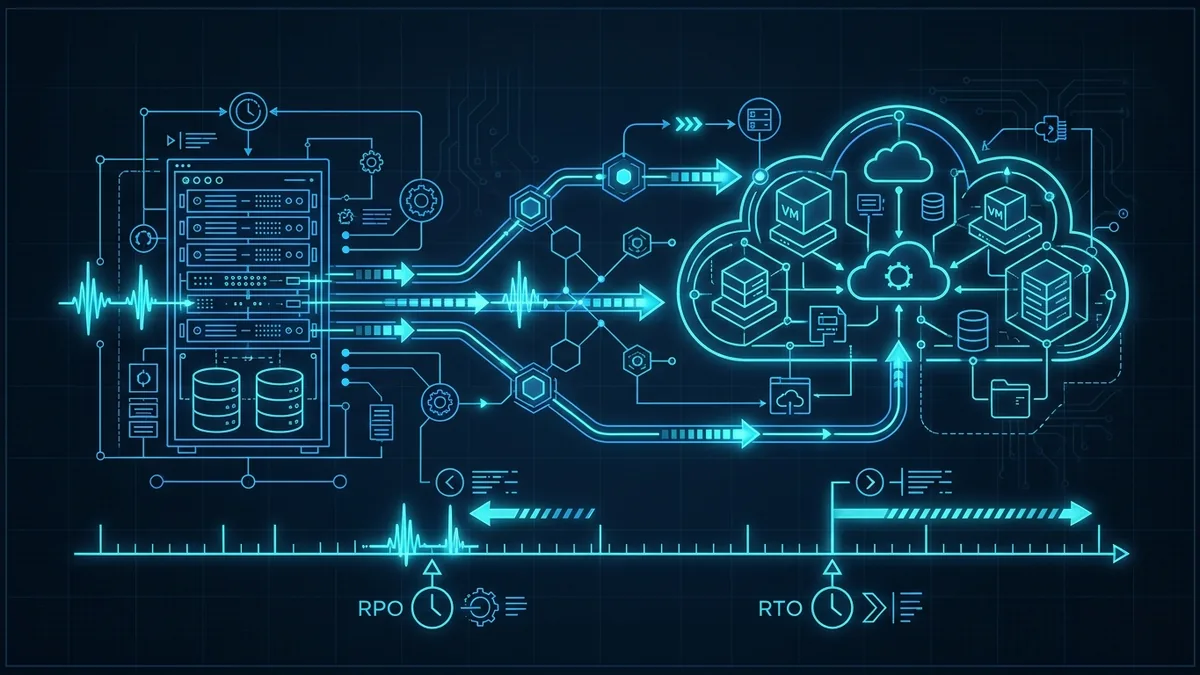
A real continuity plan isn't one document or one piece of software — it's the combination of a Business Impact Analysis, clear RTO/RPO targets, offsite replication configured to match them, and a testing schedule your team actually follows. Skip any one piece and the rest is guesswork.
This is also where South Florida's insurance and compliance reality comes in. Lenders and insurers operating in a high-risk coastal weather zone increasingly expect documented continuity planning, not just a verbal assurance that "we have backups." If cyber coverage or a banking relationship is part of your picture, it's worth reviewing our cyber insurance readiness checklist alongside your disaster plan — the two overlap more than most owners expect.
Our server and infrastructure support is built around exactly this: designing and maintaining failover-ready environments so a storm, a power surge, or a hardware failure doesn't become a business-ending event. We pair that with ongoing cybersecurity monitoring, because a failover environment that isn't protected is just a second target. For businesses across the region, our IT support across South Florida and broader small business IT solutions are built with this exact risk in mind — coastal, storm-prone, and running on tight margins for downtime.
Start with the physical basics — surge protection, elevated equipment placement, backup power — then layer on offsite virtualization so a copy of your data and applications lives outside the storm's path entirely. That combination means a destroyed server is a hardware problem to solve, not a data-loss disaster.
In practice, your critical servers get virtualized and mirrored to an offsite or cloud data center in near real time. When your primary infrastructure goes down, your team can be shifted over to that replicated environment to keep working while someone deals with the physical repairs — rather than everyone sitting idle waiting on a technician.
Continuous or near-continuous replication beats a once-a-night backup job every time, because it's configured around the recovery targets your business actually needs rather than a generic schedule. Pairing that replication with regular, scheduled failover tests is what most South Florida SMBs settle on as their baseline for storm season.
Costs vary based on data volume, number of servers, and how fast you need to be back online, so there's no single number that applies to every business. A managed IT provider can scope a replication plan sized to your actual risk, your systems, and your budget rather than a one-size-fits-all package.
Without a failover plan, recovery can take weeks depending on physical damage and equipment availability — generators, replacement parts, and technicians all get scarce after a major storm hits the whole region at once. With offsite replication and a tested failover plan already in place, operations can often resume within hours instead.
Yes — and the numbers back it up. Research from the U.S. Chamber of Commerce Foundation found the vast majority of small business owners believe they're prepared for a disaster, yet only a small fraction actually have a documented plan in place. In a region where a single storm can shut down an entire business corridor for days, that gap between confidence and preparation is exactly what a tested RTO/RPO-based recovery plan is meant to close.
Hurricane season doesn't send a save-the-date. If your servers, backups, and failover plan haven't been reviewed since last summer, now is the time — not after the first tropical storm watch is posted. Schedule a free IT assessment and we'll walk through what a real recovery plan looks like for your business, or call us directly at (561) 922-8416.
Surprise repair invoices and repeat outages signal that break-fix has stopped working. Here are five signs it's time to move to proactive device management.
Server refresh time forces a choice: buy new hardware or move to the cloud. Here is how South Florida SMBs can compare cost, performance, and physical risk.
Start with a free IT assessment — a clear, no-pressure look at where things stand and what managed IT could do for you.